











Quick Links
Charging
Charging the Pod
Charge your Control Pod via the provided USB cable using a computer or USB wall adaptor (5V, 1A rated).
Indicator Lights
A rapid flashing red Indicator light means the Control Pod is initialising. This should last for around 10 seconds.
A slow flashing red indicator light means the Control Pod charging.
A Solid red Indicator light, means the Control Pod is fully charged and ready to use.

Connecting Lighting Arms
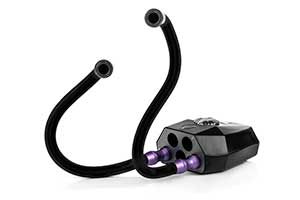
Begin use by attaching Lighting Arms to the Pod.
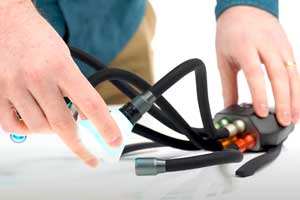
Make sure the contacts are clean and insert an arm into any port on the front of the Control Pod.
You will feel a magnetic pull, rotate the arm until it clicks into place.
Brightness Control
Manual Control
1. Press the dial on the Pod to activate manual control mode. The LED or Flash Indicator lights will pulse, this indicates which Lighting Arm you are controlling.
2. Press the dial again to select each subsequent connected Lighting Arm.
3. While an arm is pulsing, rotate the dial anti-clockwise to decrease power , or clockwise to increase power. The light will pulse when you reach maximum or minimum brightness.
4. Wait for 5 seconds to save the new power levels and exit manual control mode.

Bluetooth Control
1. Press the white Bluetooth button on the top of the Control Pod, this activates bluetooth discovery mode and disables manual control. A blue Indicator light will appear.
2. Open the Adaptalux App and tap on Connect to Control Pod/Add/Manage Pod connections button.
3. Select the Control Pod in the App interface. The blue indicator light will go out once connected to the app.
4. To turn off bluetooth, hold the Bluetooth button for a few seconds or remove all lighting arms from the Pod.

Boost Mode
Boost mode dramatically increases Pod power output at the expense of battery life.
To activate boost mode press and hold the dial until LED brightens or more flash indicator lights charge.
Boost mode can also be toggled on and off in the Adaptalux App.

Sleep Mode
To turn off the Control Pod with the lighting arms still attached, hold the bluetooth button for 8-10 seconds.
Release the button when the indicator light rapidly flashes red. Lighting arms will turn off with brightness settings saved.
To awaken the Pod, tap the bluetooth button once more.
Removing Lighting Arms
To remove the Lighting Arm, simply pull directly outwards.
Do not twist!
Disconnect all arms to automatically turn off the Pod.
Master Reset
Perform a master reset by pressing the small button inside the hole on the top of the Pod.
The Pod will cease to function and the software will be reset.
Plug the Pod into USB power. Its initialisation sequence will begin and the Pod will begin to charge.
Heat Caution
When using boost mode for extended periods, lighting arm heads may become hotter than normal. Please allow the LEDs to cool before touching the end of the arm or packing the arm for storage.
UV Caution
UV lighting arms create invisible ultraviolet radiation that can cause harm. Do not look directly into the lighting arm. UV blocking eye protection is recommended at all times while using UV lighting arms.
Flash Caution
Never shoot a Flash Arm directly into the naked eye as this can cause temporary sight loss and lead to long-term damage. Never attempt to disassemble a Flash Arm, they contain high voltage circuitry that can cause significant harm.
More Resources
Find product specifications and detailed user guides in our support knowledge base.